Plan with your best model. Build with the right model.
Plan in one Codex window. Build with another account in an isolated Git worktree. Review and apply the changes. Keep a window for every account.
Desktop app requires an Apple Silicon Mac · Check compatibility before downloading · CLI runs on macOS, Windows, and Linux
New here? How a run works · One window per account
- Choose separate planner and worker accounts
- Keep every account in its own Codex window
- Review the diff before applying changes
How it works
Three steps from task to reviewed change
- 01
Add your accounts
Sign in to the OpenAI accounts you hold, or add a ChatGPT Web or custom-model account. Each one gets its own Codex window. Open it, or Show it if it is already running.
- 02
Describe the work, pick planner and worker
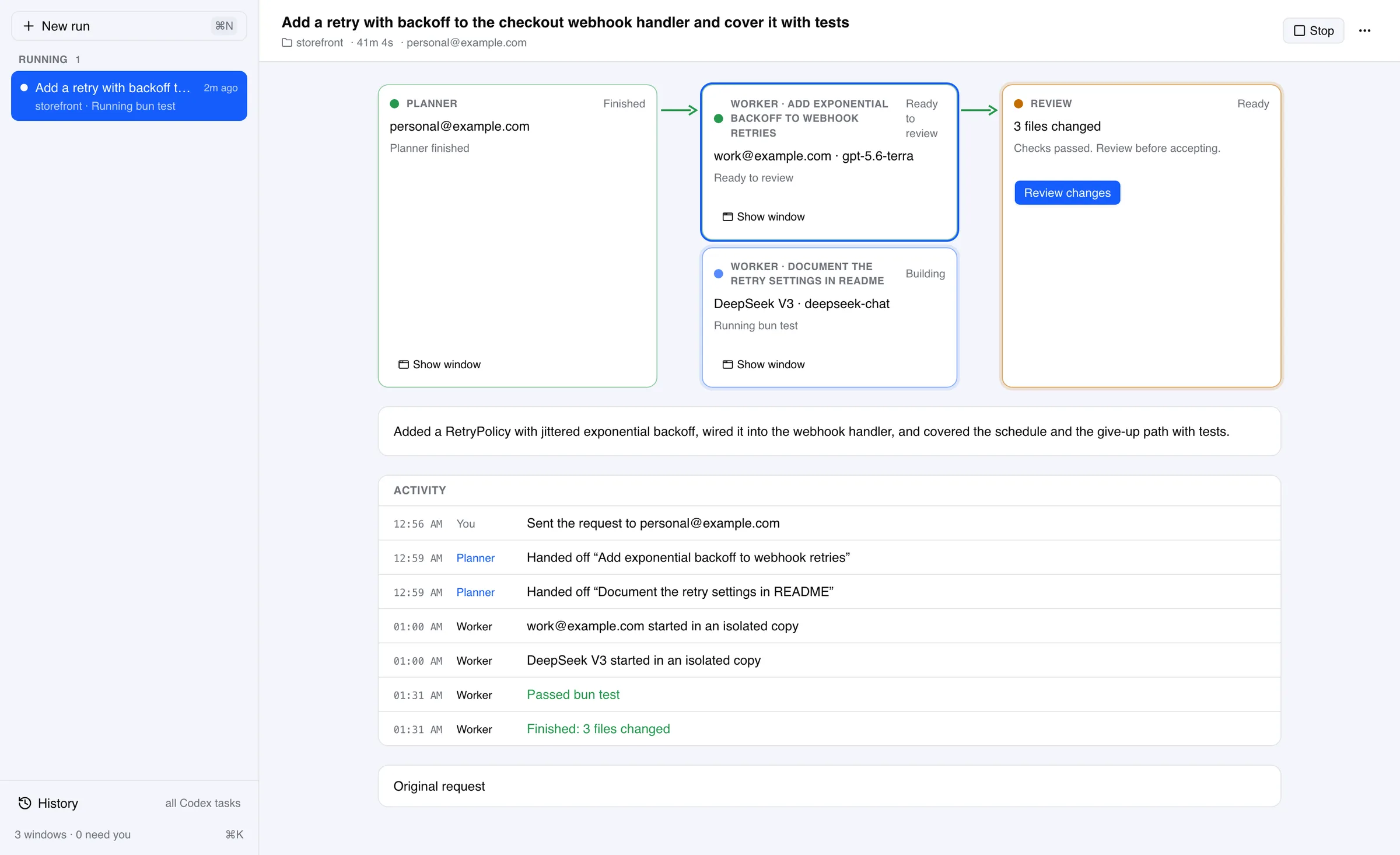
Choose a folder, the account that plans, and the account that builds. The planner works in its own window; the worker builds in an isolated Git worktree with a bounded brief.
- 03
Review and accept
Watch the run move from Building to Ready to review. Read the change, run your checks, and accept. Nothing merges without you.
New · ChatGPT Web
Out of Codex allowance, with a ChatGPT plan sitting idle
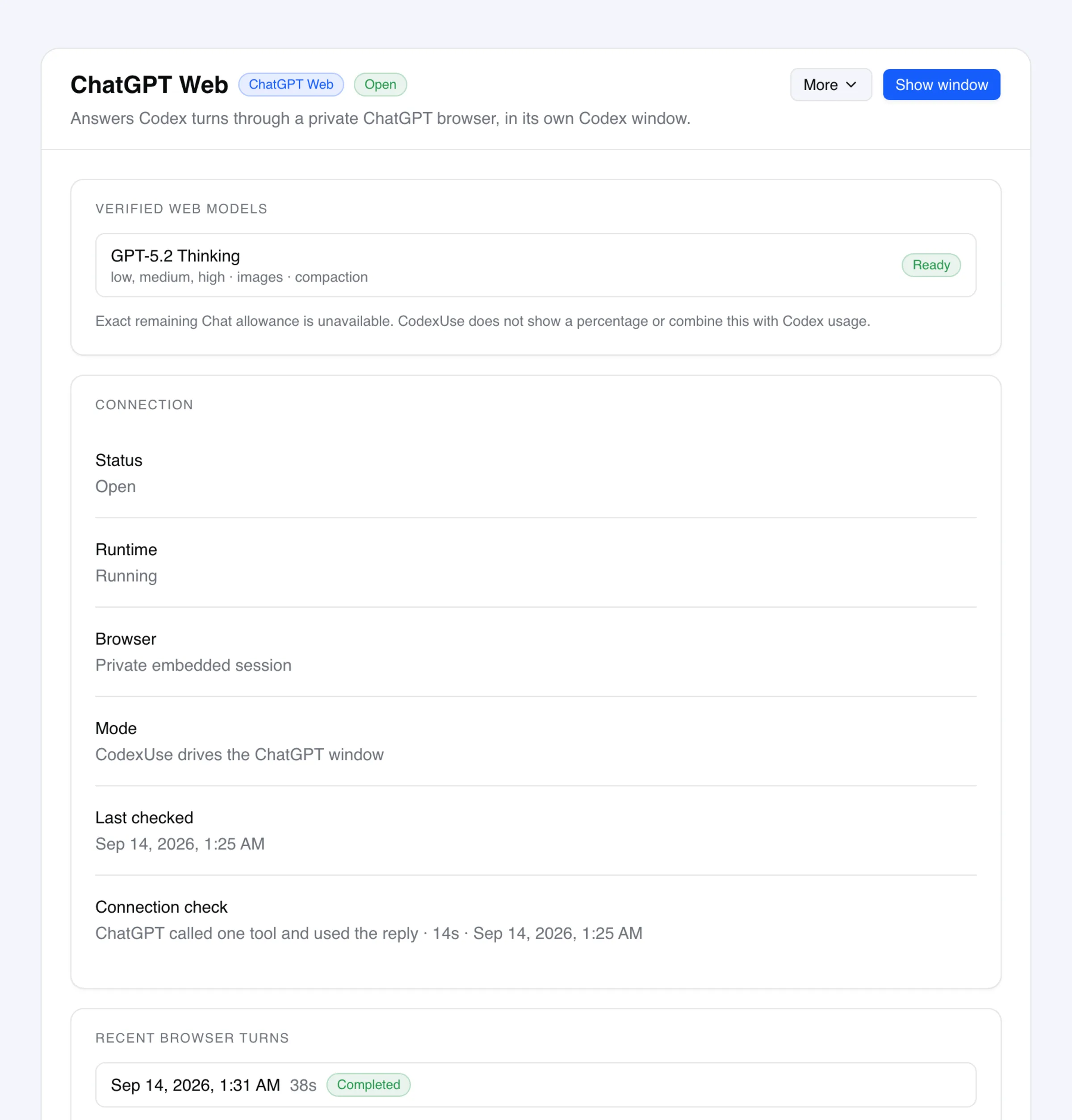
A ChatGPT Web account answers Codex tasks through the ChatGPT session already open in your regular Chrome. It gets its own Codex window and can be the worker in a run.
- Spends the Chat allowance, not the Codex allowance
- Turns run in your ChatGPT session, so they draw on the same allowance your chats do. No OpenAI account's Codex allowance is touched, and no provider bills you.
- Uses the Chrome session you already have
- The bundled CodexUse Chrome Companion runs in your regular signed-in Chrome and creates a background Temporary Chat for each Codex task. CodexUse never reads Chrome's user data files or exports or copies cookies.
- Verified with a real turn, not a handshake
- Setup ends by sending one ChatGPT turn through the connector and requiring ChatGPT to call a CodexUse tool and use the result. A connector that cannot reach CodexUse fails here, not on your first task.
Read this first. CodexUse answers each turn by reading the ChatGPT page, typing the turn, and sending it. This is not an official OpenAI integration, automating ChatGPT may not be permitted under your agreement with OpenAI, and you are responsible for how you use it. Setup needs a signed-in OpenAI account on the Mac, an OpenAI Tunnel with a secret API key, and a connector you create in ChatGPT Developer Mode. The Chrome companion installs once from the Web Store. ChatGPT reports no remaining Chat allowance for this route, so these accounts stay out of percentage-based auto-roll and Account Pool.
New · Model providers
An account doesn’t have to be an OpenAI account
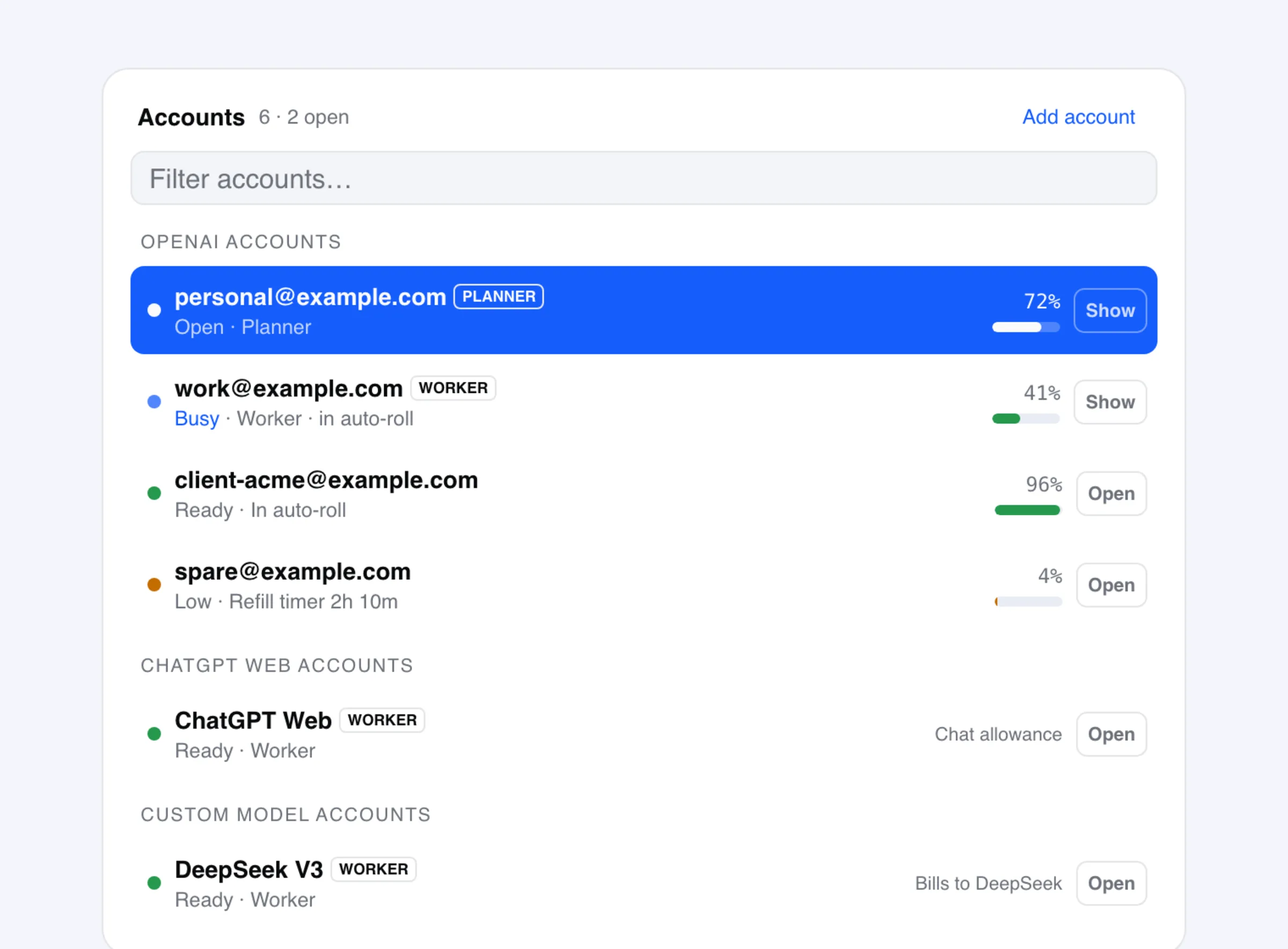
Run a supported provider model inside the Codex app as its own account, with its own window and Codex home. It can be a worker in a run when its route supports coding tools. You pay the provider directly; this does not add OpenAI quota.
- Bring your own endpoint
- Use a supported OpenAI Responses or Chat Completions route from OpenRouter, DeepSeek, Groq, or a local server. Test the provider route during setup; API compatibility alone does not guarantee every feature.
- Effort levels read from the model, not guessed
- CodexUse reads reasoning effort from the model's own metadata. It never guesses low/medium/high from a name, which is how a silently ignored setting happens.
- Separate from your OpenAI accounts
- A custom-model account has its own Codex home and its own model list, spends no OpenAI quota, and keeps its credential encrypted in CodexUse's private app database.
The honest limit. There is no ChatGPT account behind a custom-model account, so dictation and browser control are unavailable on it. Chat, tool calls, and reasoning effort depend on the provider route and model capabilities.
Everything in one place
One app for runs, accounts, windows, and models
Plan, build, review
A planner account plans in its own Codex window. Worker accounts build in isolated Git worktrees. Runs move through Running, Needs you, and Ready to review; you accept.
One window per account
Every OpenAI, ChatGPT Web, or custom-model account has one Codex window. Open starts it, Show fronts it, and CodexUse never opens a second window for the same account.
Work from your ChatGPT session
Your signed-in Chrome session answers Codex tasks on the Chat allowance. Setup needs the bundled Chrome companion, a tunnel, and a connector you create in ChatGPT.
Every local task in one list
History lists every local Codex task across your accounts and opens each one in the account that owns it. It does not merge or copy cloud ChatGPT history.
Custom-model accounts
Point an account at OpenRouter, DeepSeek, Groq, or a local server. Tools and reasoning effort depend on the model; provider usage is billed separately.
Auto-roll with guardrails
Roll new work to another account below a threshold, rejoin above another, and read a log that says why each roll happened.
Headroom and refill timers
See the usage windows and refill times Codex reports. Refill controls attempt a short background request; account limits still apply.
Account Pool API
One local endpoint routes supported Responses or Chat Completions requests across selected accounts, with failover. Client compatibility and account limits still apply.
Telegram remote
Send a task or screenshot from your phone. Codex runs it on your Mac and streams the reply back.
Encrypted Cloud Sync
Passphrase-encrypted snapshots move your accounts and settings to a second Mac in one pull. Run state and conversations stay local.
codexuse on the command line
The optional CLI shares local state with the desktop app and runs on macOS, Windows, and Linux. It does not have desktop feature parity.
Model traffic does not route through us
Model requests go direct from your Mac to OpenAI or your provider. Cloud Sync is manual, opt-in, and passphrase-encrypted.
Pricing
Try everything free for 7 days
The trial is the full app and takes no card. Buy at any point and activate in the app. 30-day refund after purchase.
- Work: separate planner and worker accounts, isolated worktrees, and review
- One Codex window per account, plus History of every local task
- Custom-model accounts: OpenRouter, DeepSeek, Groq, or a local model
- Unlimited accounts, auto-roll, headroom, and refill timers
- Account Pool local API, Telegram remote, encrypted Cloud Sync
- One license for up to 5 Macs · free updates · no subscription
one-time · up to 5 Macs · free updates
Website purchase: enter the license key from your Gumroad receipt in CodexUse. Already own Pro? Activate your key in the app; do not buy again.
What does Work do, and does it replace codex agents?
Work runs one task across your accounts. You describe the work, pick a folder and separate planner and worker accounts. The planner plans in its own Codex window. The worker builds in an isolated Git worktree and receives a bounded brief, not the planner's transcript. You review the result and accept it into your working folder without committing or pushing it. Codex already supports subagents in the app, CLI, and IDE. Work adds account selection, separate windows, worker worktrees, and a review step. The codex agents CLI command browses sessions.
Which account does the planner use?
The one you pick. CodexUse shows each account's headroom and status so you can plan on the account with the most room and build on the one you allow for that project, including a custom-model account when its route supports coding tools. CodexUse never picks a planner by price or model name.
Can I run the Codex app with multiple accounts?
Yes, on Apple Silicon macOS. Every OpenAI account and every custom-model account gets its own Codex window. Open starts that window; Show brings a running one to the front. CodexUse never opens a second window for the same account, and it never signs another account out to do it.
Will using multiple accounts get me banned?
CodexUse is for accounts you already hold: your personal login, an employer seat, separate client or contractor accounts. It signs in with the same OAuth flow the Codex CLI uses, keeps each account in its own window and Codex home, and never shares one subscription between people. It does not create accounts, bypass billing, or forge identities. Check your own plan terms before pooling quota for automated workloads.
What is a ChatGPT Web account?
It answers Codex tasks from your own ChatGPT session instead of from the Codex models. The CodexUse Chrome Companion runs in the regular Chrome profile where you are already signed in and creates a background Temporary Chat for each task. CodexUse never exports or copies Chrome cookies. Turns draw on your Chat allowance, so they do not spend the Codex allowance of any OpenAI account, and no provider bills you. Setup requires Chrome 116 or newer with the companion enabled, one signed-in OpenAI account in CodexUse, an OpenAI Tunnel with a secret API key that has Tunnels Read and Use, a connector named exactly CodexUse created in ChatGPT Developer Mode, and macOS 13 or newer on Apple Silicon. CodexUse refreshes its bundled companion in one stable local folder, opens Chrome Extensions, reveals that folder, and copies its path for the one-time Load unpacked step. ChatGPT reports no remaining Chat allowance for this route, so these accounts stay out of percentage-based auto-roll and Account Pool.
Is driving ChatGPT from CodexUse allowed?
Decide that yourself, against your own agreement. Here is exactly what happens: the CodexUse Chrome Companion reads the ChatGPT page in the background tabs it creates, types each turn, and sends it. This is not an official OpenAI integration, and automating ChatGPT may not be permitted under your agreement with OpenAI. The connection form states this, and starting setup acknowledges it without another checkbox or page. There is no mode that only watches. CodexUse uses the ChatGPT account you already hold, never creates accounts, and never shares one subscription between people. Browser turns run in Temporary Chat, which OpenAI says it may retain for up to 30 days for safety purposes; workspace and account controls still apply.
Can I run a non-OpenAI model in the Codex app?
Yes. A custom-model account can point at any provider that exposes an OpenAI-compatible Responses or Chat Completions endpoint: OpenRouter, DeepSeek, Groq, or a model running on your own Mac. CodexUse runs a local gateway on 127.0.0.1 that presents the Responses API to Codex and translates to the provider's shape. That account spends no OpenAI quota, keeps its credential encrypted in CodexUse's private app database, and shows only its own models in the picker. Dictation and browser control call ChatGPT's backend, so they are unavailable on it.
Is a custom provider cheaper than a ChatGPT plan?
Sometimes, and not automatically. You are trading a flat subscription for metered billing, so heavy use of a frontier model often costs more than the plan does. It usually wins when a cheaper model is good enough for most of your work, or when you already pay a provider and want the Codex app as the interface. Measure your own volume before deciding.
How is this different from the free account switchers?
Free tools swap ~/.codex/auth.json for the Codex CLI. CodexUse gives every account its own Codex window, runs planner and worker jobs across accounts with review before anything merges, keeps a History of every local task, adds custom-model accounts, headroom and refill timers, auto-roll, Telegram, Account Pool, and encrypted Cloud Sync. If you only need CLI account switching, a free tool is a reasonable choice.
Do I need API keys?
Not for OpenAI. CodexUse uses the same OAuth login as the Codex CLI, so you sign in with the account you already have. Two exceptions: a custom-model account needs that provider's own credential, which is encrypted in CodexUse's private app database and never written into config files; and Account Pool mints a separate local key for the app you point at it.
What is Account Pool?
Account Pool turns selected saved Codex accounts into one local API for another OpenAI-compatible app. That app gets one base URL and one key, while CodexUse shares quota across the selected accounts, load-balances new requests, and fails over when one account hits limits or runtime trouble. It runs on your machine and is not a hosted service.
How does auto-roll work?
Set a percent-left threshold, rank the eligible accounts if you want a specific order, and CodexUse rolls new work to the next account when the active one drops to that level. A rejoin threshold brings an account back once it refills, and a confirm countdown cancels stale decisions before they fire. Available during the trial and unlocked with Pro.
Which desktop platforms are supported?
Current public desktop releases target macOS on Apple Silicon. Intel Mac, Windows, and Linux desktop builds are not shipped. For terminal workflows on another machine, install the optional codexuse CLI with npm.
What do I get if I buy instead of starting the trial?
The same app. Pro is a one-time lifetime license for up to 5 Macs, with free updates and no subscription. It keeps every feature unlocked after the trial. If you buy on the website, enter the license key from your Gumroad receipt in CodexUse. App-initiated checkout watches for payment confirmation; manual key activation remains available. There is a 30-day refund window.
Plan, build, and review with every Codex account in one Mac app
Install CodexUse, add your accounts, and give each one its own Codex window. Start a run when you want one account to plan and another to build. Add a custom-model account when you want a model that isn’t OpenAI’s.